Automated CAD Model Analysis
Blog Post 1.01.03 - Generate Optimal Routings with Automated CAD Model Analysis
Help your company determine the optimal routing path for simple-to-complex parts. Read More ...

Global Edge Video Blog-1.01

Generate Optimal Routings with Automated CAD Model Analysis
With many manufacturing operations, there is a strong dependence on the tribal knowledge of your engineering staff. This tribal knowledge applies to how parts are both designed and how they are manufactured / fabricated. The design side needs to understand the capabilities of specific manufacturing processes and the specific costs of those manufacturing processes. Also factored in is the volume of production as it relates to each specific manufacturing process. With sheet metal fabrication, this could include turret press versus laser or water cutter to determine the most cost-effective path based on production volume. Other factors can include tolerance factors based on customer specifications. Regardless of the scenario, tribal knowledge many times is an important factor to cost effectively produce products and speeding up the whole design to manufacturing workflow process.
Key functionality delivered with Global Edge Engineering Assistant is the capability to incorporate tribal knowledge into the quoting, engineering, and manufacturing workflow process. The foundation of this process starts with “Automated CAD Model Analysis” which does a complete analysis of sheet metal parts.
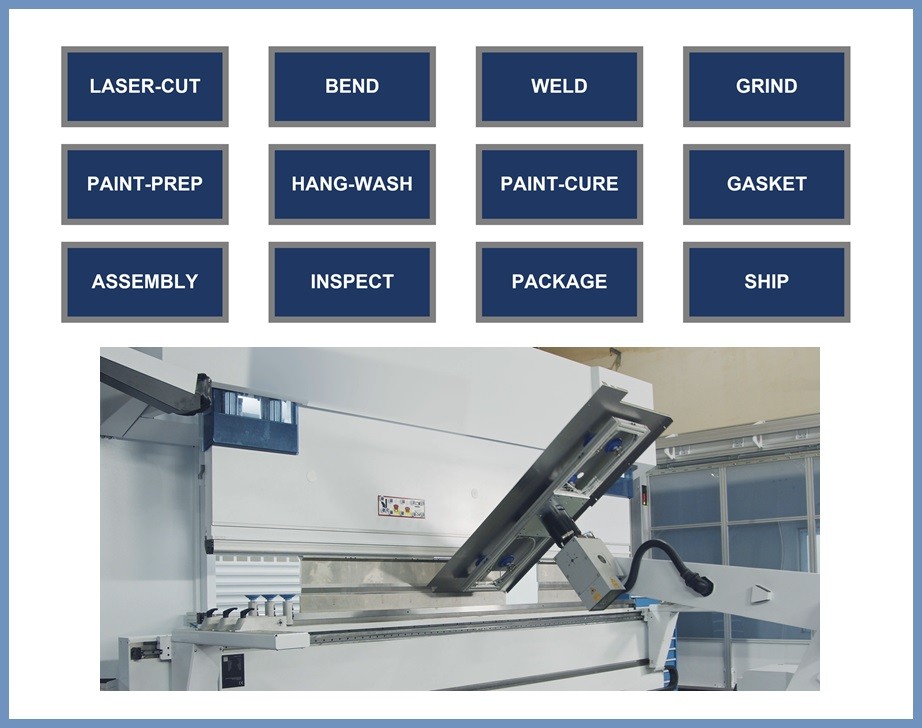

Automated CAD Model Analysis
The Automated CAD Model Analysis provided by Global Edge Engineering Assistant includes analysis and database storage of the following CAD part parameters:
- Material / Thickness / Part Weight / Bend Radius
- Blank / Flat (Length & Width)
- Cutouts / Holes (Count & Size)
- Minimum / Maximum Bend Length
- Minimum / Maximum Bend Angle
- Minimum / Maximum Flange Width
- Minimum Pem Hole to Bend Line Gap
- Minimum Embossment to Bend Line Gap
- Minimum Louver to Bend Line Gap
- Maximum Up / Maximum Down Bend
- Fold / Hem / Extrude Counts
- Minimum Taper / Die Cut to Bend Line Gap
Automated Routing Generation
Global Edge Engineering Assistant provides capabilities that provides the generation of optimal routings based on the above CAD Part Parameters (Detail of Automated Routing Generation).

The CAD part parameters serve as foundation to establish tribal knowledge logic and procedures that helps automate and speed up the quoting, engineering and manufacturing workflow process while reducing the dependency of relying on key personnel when they are not available. Many products when they are designed and manufactured, can take various routing paths based on part characteristics, production levels and customer specifications.
The primary purpose of capturing and storing CAD part parameters helps establish a foundation of information that can drive quoting, design engineering, manufacturability testing, and routing generation. With regards to routing generation, Global Edge Engineering Assistant provides a simplified and innovative approach selecting optimal routing steps by combining CAD part parameters with tribal knowledge logic.
This process starts with the definition of possible routing steps as illustrated on the following screen:
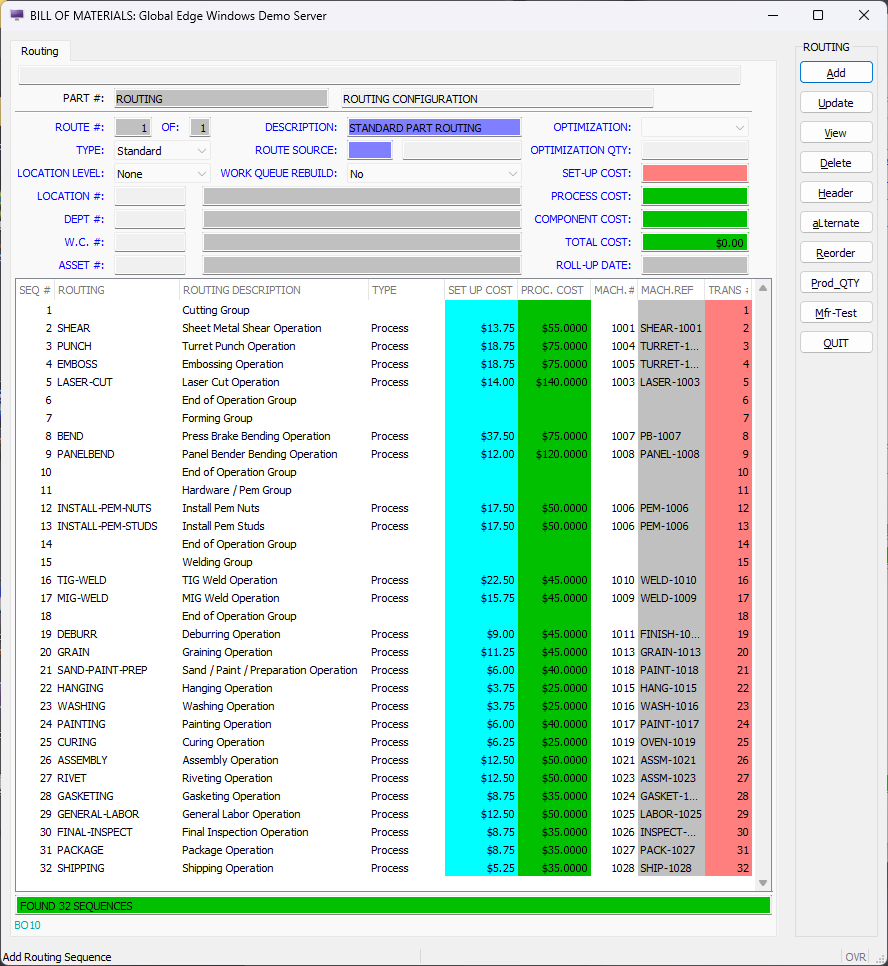
- The above screen are the following routing groups: Cutting Group (Sequence #1)
- SHEAR
- PUNCH
- EMBOSS
- LASER-CUT
- The above routing group (Cutting Group), the illustration includes four possible cutting operations that are automatically based on logic driven by the CAD part parameters. This logic can include automatically importing part sizes into nesting logic to determine if a part requires a “SHEAR” operation. Further logic can be incorporated to determine if a sheet metal part should be cut with a Turret Punch Press or Laser Cutter based on cost and/or delivery time. For example, the PUNCH or LASER-CUT option can also be determined by part hole count, and/or edge quality. Another sample form of logic is if a part contains an embossment, as determined by the CAD model analysis, it rules out the “LASER-CUT” option. Forming Group (Sequence #7)
- BEND
- PANEL-BEND
The routing group (Forming Group), the illustration includes a BEND operation that is tagged to a Press Brake, and a PANEL-BEND operation that is tagged to Panel Bender in our example. The logic associated with the Forming Group incorporates flange size CAD part parameters to determine which bending machine can handle and is best suited to form a sheet metal part. An example of this is if a part has an internal down bend that exceeds the size constraints of a Panel Bender, the BEND operation will then be automatically selected.
Hardware / Pem Group (Sequence #11)
- INSTALL-PEM-NUTS
- INSTALL-PEM-STUDS
The routing group (Hardware / Pem Group), the illustration includes Pem Nuts and Pem Studs which can be driven if the CAD model analysis detects Pem holes which would automatically select the INSTALL-PEM-STUDS operation and include the matching number of studs into the bill of materials. This logic can also include matching the same number of Pem Studs and including the INSTALL-PEM-NUTS into the routing path or could prompt the user to input the number of Pem Nuts. Zero, no Pem Holes will preclude these routing operations from the routing list.
Welding Group (Sequence #15)
- TIG-WELD
- MIG-WELD
The routing group (Welding Group), the illustration includes either TIG or MIG welding which can simply include logic as to welding option based on the Material automatically determined with the CAD Model Analysis.
Remaining Routing Options (Sequence #19 through Sequence #32)
- DEBURR
- GRAIN
- SAND-PAINT-PREP
- HANGING
- WASHING
- PAINTING
- CURING
- ASSEMBLY
- RIVET
- GASKETING
- GENERAL-LABOR
- FINAL-INSPECT
- PACKAGE
- SHIPPING
The remaining routing options can be defined as standard options, or have logic incorporated based on specific CAD part parameters or previous operations. These parameters or operations could include if the part was cut with a Turret Punch Press, that would then automatically the DEBURR operation. Operations associated with Painting could be automatically selected if the part material is Cold Rolled Steel, and not selected if the material is Stainless Steel.
As each routing step is selected with automated routing generation capabilities, Global Edge Engineering Assistant automatically calculates process times for each routing step. For example, Global Edge Engineering Assistant calculates laser cut times based on CAD part parameters which includes:
- Part Perimeter Length
- Total Cutout Perimeter Length
- Number of Cutouts
The following is an explanation how Global Edge Engineering Assistant calculates the Laser Cut Times. This starts adding a profile for the “LASER-CUT” manufacturing process followed by adding specific user defined formulas:
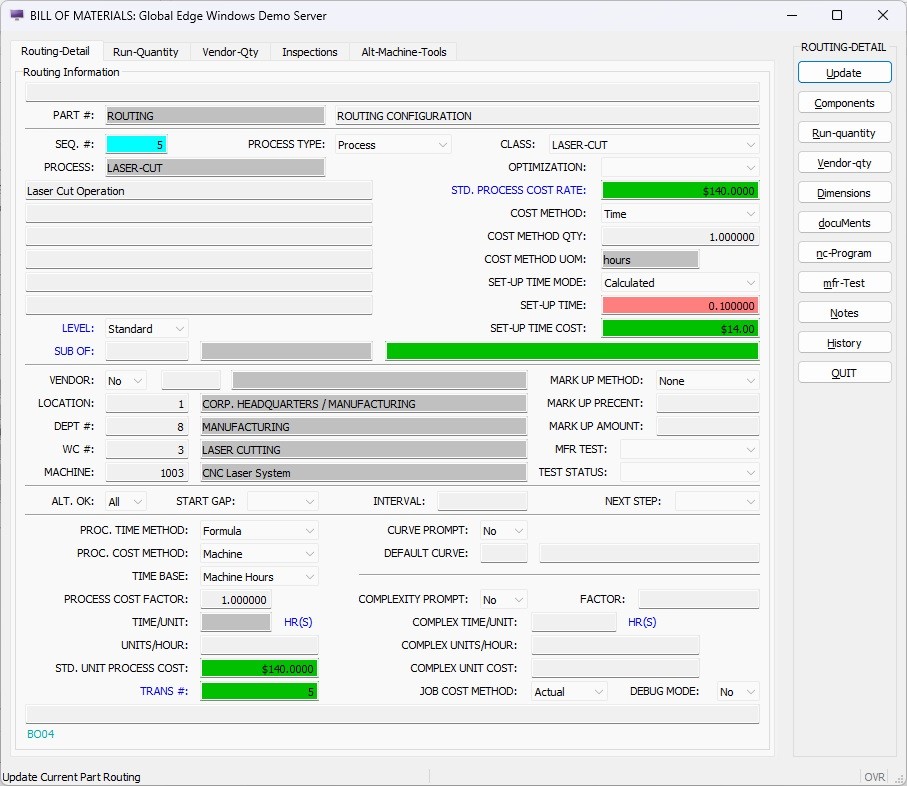
Sample Calculated Laser Cut Times
The following is an example of how Global Edge Engineering Assistant automatically calculates Laser Cut Times during the routing generation process. The following is a sample DXF flat file to illustrate how laser cut times without having to utilize nesting software at the quoting stage:

The following is an example how Global Edge Engineering Assistant automatically calculates for the above sheet metal DXF flat file:
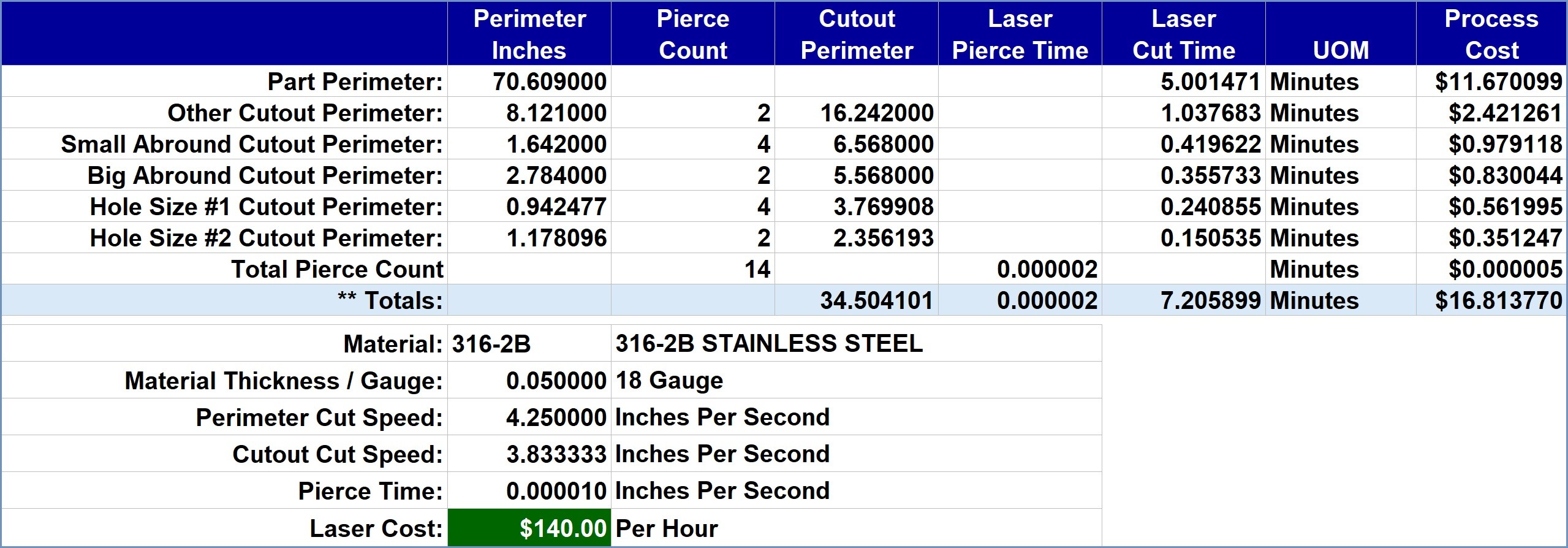
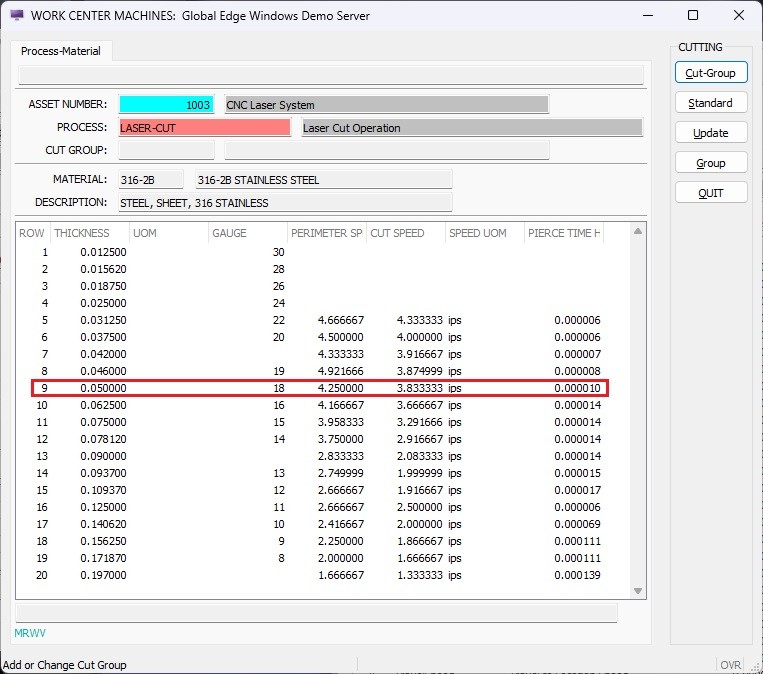
The following screen indicates the Laser Cut Speeds for 316-2B Stainless Steel which includes values for a variety of Thicknesses / Gauges and includes Perimeter Cut Speeds, Cutout Cut Speeds and Pierce Times:
The following is an explanation how Global Edge Engineering Assistant calculates the Laser Cut Times. This starts adding a profile for the “LASER-CUT” manufacturing process followed by adding specific user defined formulas:
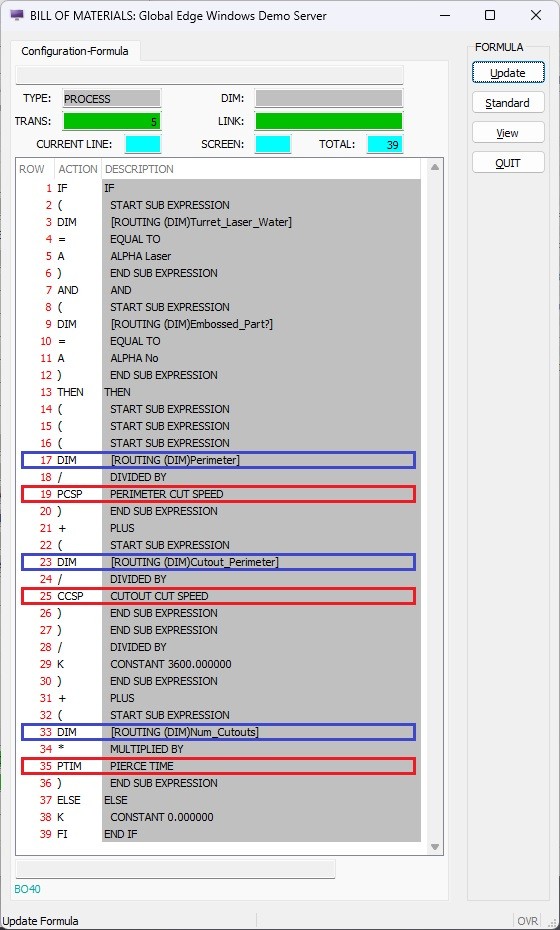
The formula on the above screen includes:
Line 17 “DIM [ROUTING (DIM)Perimeter]” that brings in the values from the importation of the DXF Flat File, which is divided by Line 19 “PCSP PERIMETER CUT SPEED” which automatically generates the time the Laser Cut Time for the perimeter based on the material and thickness.
Line 23 “DIM [ROUTING (DIM)Cutout_Perimeter]” that brings in the values from the importation of the DXF Flat File, which is divided by Line 25 “CCSP CUTOUT CUT SPEED” which automatically generates the time the Laser Cut Time for the Cutout Perimeter based on the material and thickness.
Line 33 “DIM [ROUTING (DIM)Num_Cutouts]” that brings in the values from the importation of the DXF Flat File, which is multiplied by Line 35 “PTIM PIERCE TIME” which automatically generates the time the Laser Cut Time for the Piercing Time based on the material and thickness.
Line 17 “DIM [ROUTING (DIM)Perimeter]” that brings in the values from the importation of the DXF Flat File, which is divided by Line 19 “PCSP PERIMETER CUT SPEED” which automatically generates the time the Laser Cut Time for the perimeter based on the material and thickness.
Line 23 “DIM [ROUTING (DIM)Cutout_Perimeter]” that brings in the values from the importation of the DXF Flat File, which is divided by Line 25 “CCSP CUTOUT CUT SPEED” which automatically generates the time the Laser Cut Time for the Cutout Perimeter based on the material and thickness.
Line 33 “DIM [ROUTING (DIM)Num_Cutouts]” that brings in the values from the importation of the DXF Flat File, which is multiplied by Line 35 “PTIM PIERCE TIME” which automatically generates the time the Laser Cut Time for the Piercing Time based on the material and thickness.
Summary
Global Edge Engineering Assistant provides an innovative approach to automate labor intensive engineering workflow tasks associated with quoting, design and preparing information for the shop floor. This includes eliminating the manual measurement of sheet metal CAD parts and incorporating tribal knowledge rules into the routing generation process to generate accurate and timely information that can be integrated throughout the manufacturing enterprise. This includes the following features and benefits:
- Automated Analysis of Customer Specifications / CAD Drawings
- Automated Routing Generation from CAD Part Parameters
- Automated Material Size Selection for Sheet Metal Nestings
- Automatically Determines How Sheet Metal Parts are Fabricated
- Eliminates Manual Routing Generation of Sheet Metal Parts
- Determines Most Cost-Effective Routing to Fabricate Sheet Metal Parts
Optimal Routings with Automated CAD Model Analysis
Empowering Manufacturing Efficiency Through Intelligent Pathways
Introduction
In the modern manufacturing landscape, the ability to swiftly and accurately determine the optimal routing for parts and assemblies is pivotal to a company’s competitive edge. Traditionally, these decisions have been rooted in the tribal knowledge of seasoned engineering staff—insights forged through years of hands-on experience and familiarity with both product design and fabrication processes. However, as industries shift toward digitalization and automation, the need has emerged for a more systematic, data-driven approach. Enter Automated CAD Model Analysis: a transformative solution that deciphers the most efficient manufacturing paths by analyzing part geometry, process constraints, cost factors, and production volumes with unprecedented precision.
The Role of Tribal Knowledge in Manufacturing
Manufacturing operations have long depended upon the cumulative wisdom of experienced engineers and technicians. This tribal knowledge—an invaluable but often undocumented cache of best practices, lessons learned, and subtle design-to-fabrication nuances—guides decision-making from the earliest design phase through to final assembly.
- Design Nuances: Engineers rely on their understanding of material properties, formability, and tolerances to produce parts that not only function as intended but are also manufacturable at scale.
- Process Selection: The choice between different manufacturing processes (such as stamping, laser cutting, or waterjet) is influenced by an engineer’s prior experiences with cost, throughput, and quality outcomes.
- Cost and Volume Considerations: Determining the breakeven points for different fabrication methods is often a mental calculation—balancing tool wear, machine availability, and setup times against anticipated production volumes.
While tribal knowledge accelerates decision-making and problem-solving, its tacit nature presents risks. Expertise concentrated in a few individuals makes organizations vulnerable to loss of knowledge, inconsistent outcomes, and bottlenecks when scaling operations or onboarding new staff.
Automated CAD Model Analysis: The Next Evolution
Automated CAD Model Analysis addresses these challenges by integrating advanced software tools with intelligent algorithms. These systems can interpret digital designs, assess manufacturability, and recommend optimal routing paths for each part or assembly—bringing repeatability, transparency, and speed to the engineering workflow.
How Automated CAD Model Analysis Works
At its core, Automated CAD Model Analysis evaluates the geometric and material data embedded within CAD files. This involves:
- Feature Recognition: Identifying holes, bends, cutouts, and other geometric features that influence fabrication options.
- Process Mapping: Matching features to compatible manufacturing processes (e.g., determining whether a part is best produced by a turret press, laser cutter, or waterjet machine).
- Cost Estimation: Calculating the impact of design choices on material usage, cycle time, machine wear, and required tooling.
- Tolerance & Specification Analysis: Flagging features that may require secondary processes or tighter control based on customer requirements.
- Volume Optimization: Factoring in anticipated production volumes to recommend routing paths that minimize per-unit costs, setup times, and waste.
Case Example: Sheet Metal Fabrication
Consider a company specializing in sheet metal fabrication. For a given assembly, Automated CAD Model Analysis can:
- Assess part geometry to determine if features are more efficiently manufactured via punching, laser, or water cutting.
- Analyze production volumes to advise when a high-speed turret press becomes more cost-effective than a slower (but more flexible) laser cutter.
- Incorporate customer-specified tolerances, recommending tighter process controls where necessary or flagging potential issues before parts reach the shop floor.
- Summarize the costs and lead times associated with each routing path, allowing engineers to make informed decisions based on concrete data rather than gut feel.
Key Benefits of Automated Routing Solutions
- Consistency and Standardization: By automating the analysis of CAD models, organizations eliminate variability introduced by individual preferences or experience levels, ensuring every routing decision is based on the same objective criteria.
- Accelerated Design-to-Manufacturing Workflow: Automated analysis drastically reduces the cycle time between initial design and shop floor release, empowering companies to respond more rapidly to customer demands and changes.
- Informed Cost Management: Robust cost estimation tools embedded in automated analysis platforms provide accurate, real-time feedback to designers, helping them optimize parts for manufacturability and cost from the outset.
- Scalability and Knowledge Retention: As tribal knowledge is digitized and codified into automated systems, organizations become less reliant on a handful of experts, preserving critical insights for future generations of engineers.
Implementation Considerations
Adopting Automated CAD Model Analysis is not without challenges. Key considerations include:
- Data Quality: The accuracy of routing recommendations depends on the completeness and clarity of CAD data. Organizations should ensure standardized modeling practices and metadata annotation.
- Integration with Existing Systems: Automated analysis tools must interface smoothly with CAD, PLM (Product Lifecycle Management), and ERP (Enterprise Resource Planning) systems to ensure seamless information flow and traceability.
- User Training and Change Management: As with any process of transformation, successfully embedding automation requires buy-in from engineering and manufacturing teams, as well as ongoing training and support.
- Customization: Routing algorithms must be tailored to reflect company-specific processes, machines, cost structures, and customer requirements.
Beyond Sheet Metal: Applications Across Manufacturing
While sheet metal offers a clear example, Automated CAD Model Analysis extends to a multitude of industries—automotive, aerospace, electronics, consumer goods, and more. Its intelligent routing capabilities can optimize:
- Machined components (milling, turning, drilling)
- Plastic injection molded parts
- Welded and assembled structures
- 3D printed prototypes and production components
By leveraging machine learning and historical production data, these systems continuously improve, learning from past projects to refine routing recommendations and further reduce cost and lead time.
The Future: Toward Automated, Closed-Loop Manufacturing
Ultimately, the integration of Automated CAD Model Analysis is a steppingstone in the broader journey toward fully automated, closed-loop manufacturing. In this vision, digital models flow seamlessly from design to production—validated, optimized, and routed with minimal human intervention. Real-time feedback from the shop floor informs future designs, while predictive analytics preempt bottlenecks and quality issues.
Conclusion
Automated CAD Model Analysis delivers a compelling answer to the long-standing challenge of translating tribal knowledge into actionable, scalable workflows. By systematically evaluating part geometry, process constraints, tolerances, and production volumes, these tools empower engineering teams to make optimal routing choices quickly and consistently reducing cost, improving quality, and accelerating time-to-market. As manufacturers continue to digitize and automate, investing in such solutions will be critical for sustained success in an ever-evolving marketplace.