Automated Sheet Metal Batch Unfolding
Blog Post 1.03.03 - Automated Routing Generation and Machine Tool Selection
Optimize shop floor velocity and efficiency with automated routing generation. Read More ...

Global Edge Video Blog-1.03

Optimize Shop Floor Velocity and efficiency with Automated Routing Generation
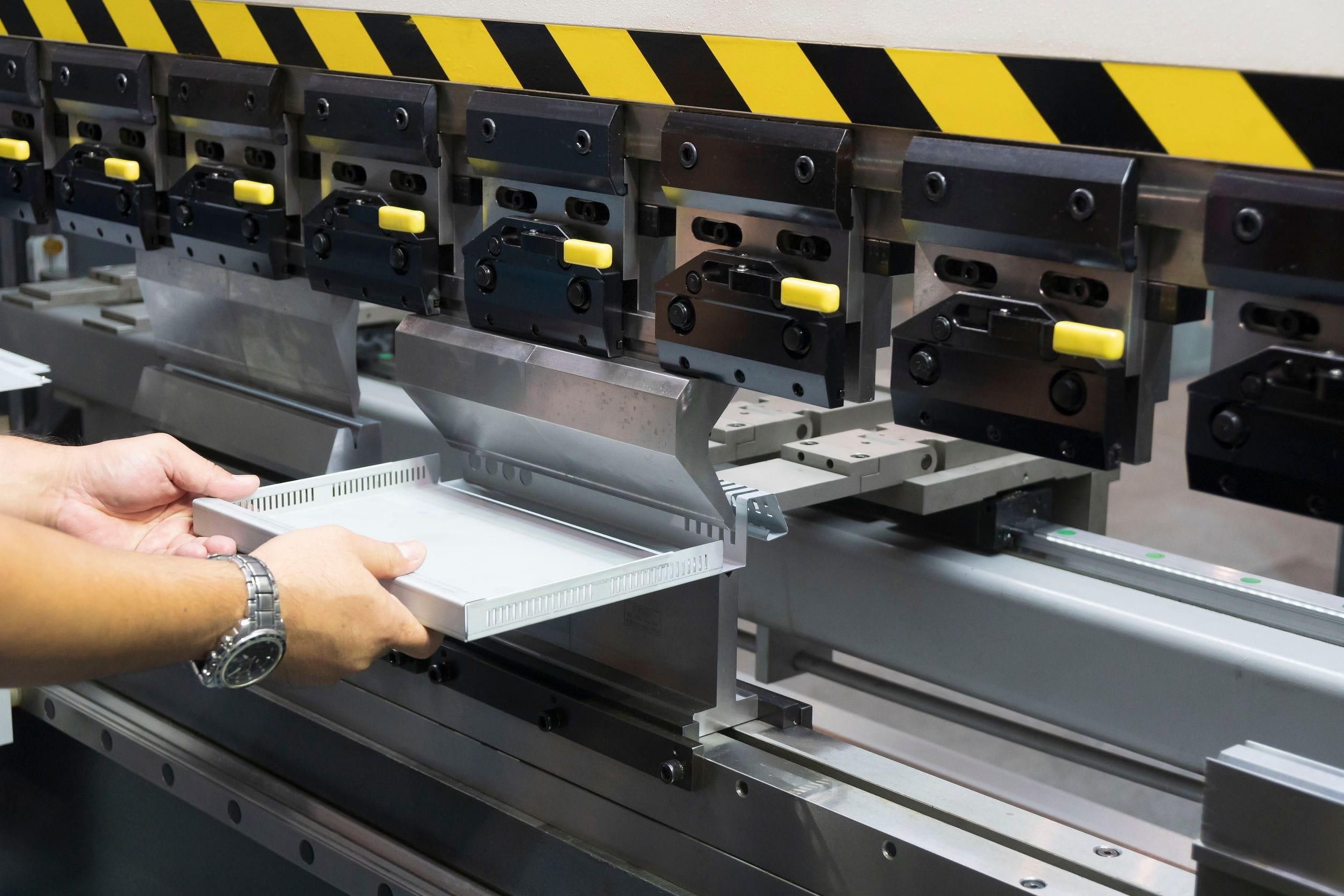
A labor-intensive portion of preparing information for the shop floor is determining the proper routing steps including the matching of the proper machine tool. This matching of the proper machine tool includes making sure parts such as a sheet metal part falls within the parameters of the bending machine tool.
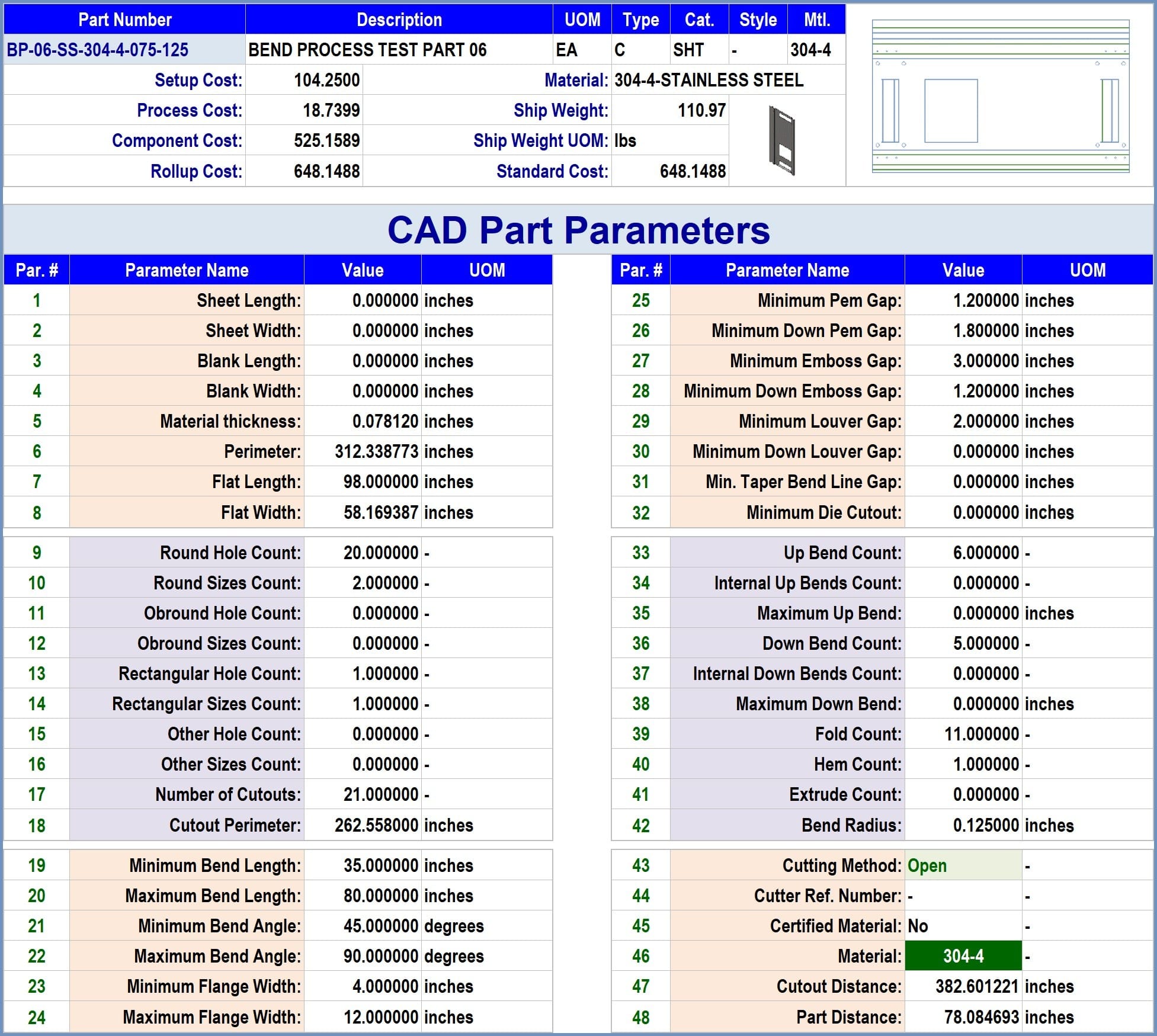
Global Edge Engineering Assistant starts with the capability of analyzing and capturing CAD Part Parameters from 3D CAD Models. These CAD Part Parameters include the following:
Sample CAD Part Parameters
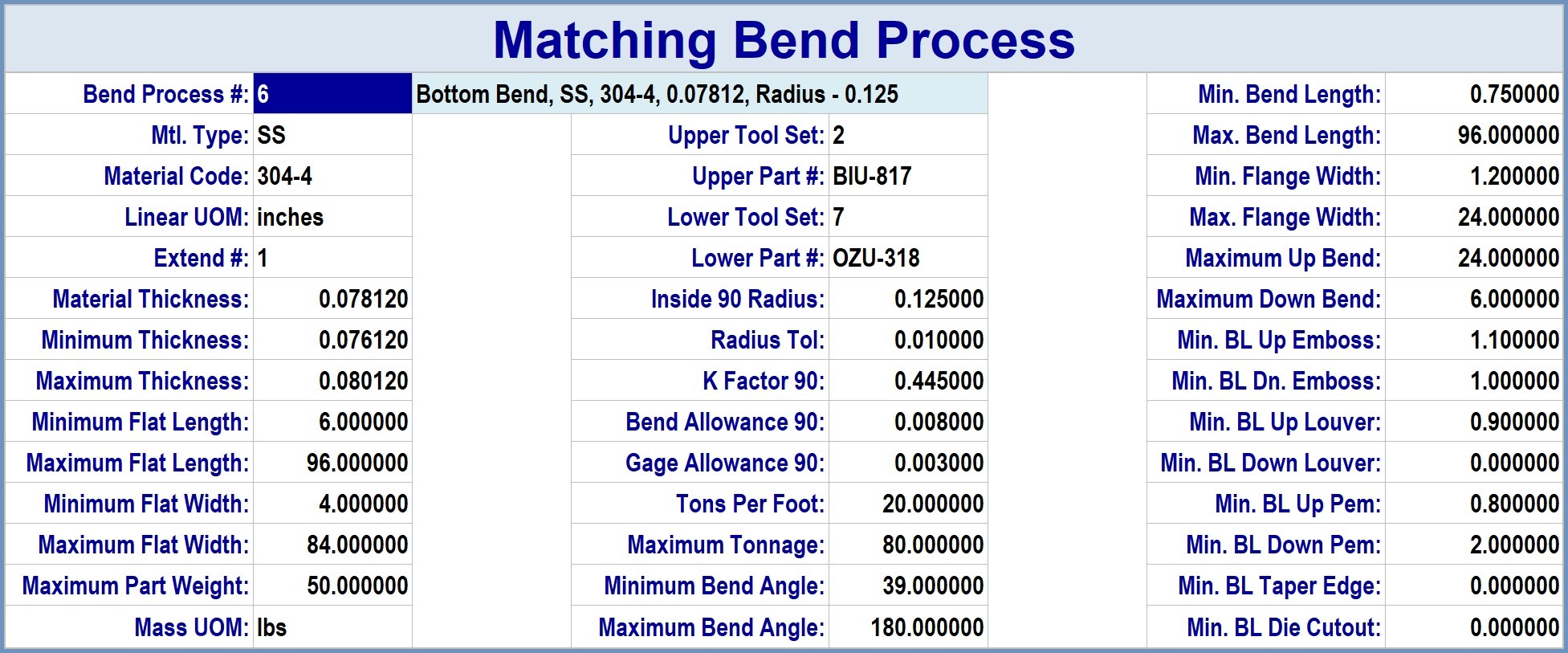
After Global Edge Engineering Assistant analyzes and imports the above CAD Part Parameters, the software subsequently matches the sheet metal part with the proper Bend Process:
This automated process can be part of a batch process of processing large daily production batches of sheet metal parts that includes an "Automated Production Work Queue":
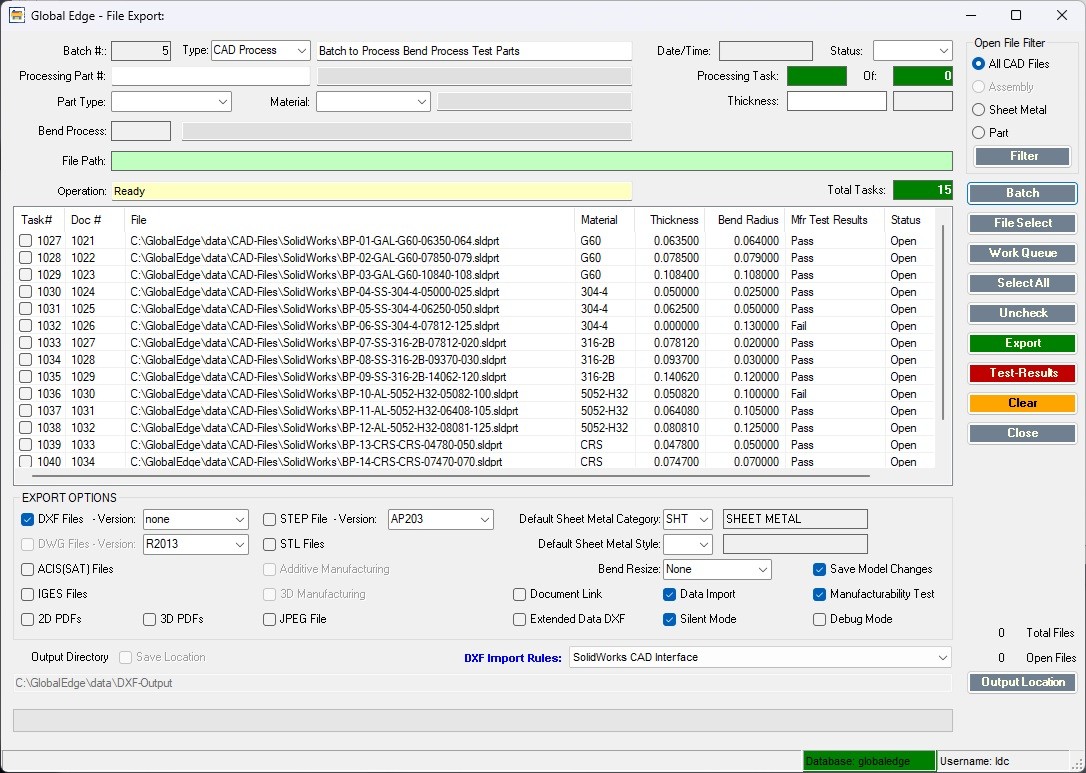
- Automated Routing Generation Based on CAD Part Parameters
- Feature Specific Work Instructions
- Helps Eliminate Shop Floor Errors
- Increases Shop Floor Velocity
- Improves Customer Satisfaction
Automated Routing Generation and Machine Tool Selection
Optimizing Shop Floor Velocity and Efficiency Through Smart Manufacturing Solutions
In the dynamic landscape of modern manufacturing, shop floor optimization has become a central pillar for competitiveness, quality, and speed. One of the most labor-intensive aspects of preparing information for the shop floor involves determining the appropriate routing steps and matching each step with the correct machine tool. This process, traditionally performed manually, can be both time-consuming and error-prone—especially in industries like sheet metal fabrication, where the complexity and variety of parts demand precise and flexible planning.
The Challenge of Efficient Shop Floor Routing
Routing refers to the sequence of operations required to manufacture a particular part. For each step, the correct machine tool must be selected, not only for efficiency but also to ensure the part’s parameters fit within the capabilities of the machine. For example, a sheet metal part designed with particular bends, thicknesses, and dimensions must be matched with a bending machine that can accommodate those specifications. Historically, this matching process has relied heavily on experienced personnel who draw from tribal knowledge—information that is often undocumented and limited to a select group.
Manual routing presents several challenges:
- Time Consumption: Reviewing CAD models, referencing machine capabilities, and developing routings by hand slows down production planning.
- Error Potential: Human error in matching part parameters to machine capabilities can lead to shop floor mistakes, wasted materials, and lost time.
- Knowledge Silos: Expertise is often isolated among senior staff members, making the process vulnerable when these individuals are unavailable.
- Inconsistency: Manual processes can result in inconsistent work instructions and routings, impacting product quality and repeatability.
To address these pain points, next-generation solutions leverage automation, digital analysis, and smart data retrieval to transform how routings and machine tool selections are generated.
Global Edge Engineering Assistant: A Breakthrough Solution
Global Edge Engineering Assistant exemplifies a paradigm shift in shop floor planning. Starting with deep analytical capabilities, this system can capture and interpret CAD part parameters directly from 3D CAD models. The process encompasses a wide range of features:
- Comprehensive CAD Parameter Analysis: The system extracts detailed specifications from CAD files, including dimensions, thickness, bend angles, hole placements, material types, and tolerances.
- Automated Comparison: Extracted CAD part parameters are automatically compared against a database of process parameters for machine tools, such as bending machines, laser cutters, or stamping presses. This ensures the most suitable tool is selected for each operation.
- Routing Generation: Using the matched parameters, the Engineering Assistant generates an optimal fabrication route, ordering tasks to maximize efficiency and minimize setup time.
- Work Instruction Creation: The system provides feature-specific work instructions, ensuring operators have clear, actionable steps tailored to each part’s requirements.
- Knowledge Capture and Dissemination: By embedding tribal knowledge and best practices into digital workflows, valuable insights are preserved and made accessible across the manufacturing enterprise.
Automated Routing Generation: How It Works
At its core, automated routing generation is driven by sophisticated algorithms that interpret CAD part data and cross-reference this information with machine tool capabilities. The process unfolds in several stages:
Step 1: CAD Model Analysis
- The Engineering Assistant imports 3D CAD files and scans all relevant part parameters.
- Parameters such as material type, thickness, bends, holes, notches, and finishing requirements are catalogued and stored for reference.
Step 2: Parameter Matching
The system evaluates each routing step (e.g., cutting, bending, punching) by comparing the part’s requirements to the specifications of available machine tools.
For a sheet metal part, the system checks if the bending angles, radii, and lengths fall within the tolerance and capability of each bending machine.
If multiple machines are capable, the system assesses factors such as current workload, setup time, and historical performance to select the optimal tool.
Step 3: Routing Sequence Generation
Once tool matches are confirmed, Global Edge Engineering Assistant sequences the routing steps to maximize shop floor velocity.Factors such as tool change frequency, part travel distance, and machine availability are considered to minimize bottlenecks and idle time.
Step 4: Feature-Specific Work Instructions
For each routing step and machine, the system generates clear, detailed instructions tailored to the specific part and feature.
This guidance includes setup parameters, safety checks, quality control points, and finishing requirements—reducing ambiguity and error.
Step 5: Enterprise Knowledge Integration
All work instructions, routing decisions, and best practices are stored in a centralized repository, accessible to team members enterprise-wide.
This enables continuous improvement, training, and rapid scaling across multiple sites and teams.
Benefits and Impact on Shop Floor Velocity
The adoption of automated routing generation and intelligent machine tool selection offers transformative benefits:
- Accelerated Planning Cycles: Automated analysis and routing reduce planning time from hours or days to minutes, enabling rapid response to new orders and design changes.
- Error Reduction: Feature-specific instructions and parameter matching virtually eliminate shop floor errors due to tool mismatches or ambiguous guidance.
- Increased Shop Floor Velocity: Optimized routing sequences and minimized bottlenecks improve throughput, shorten lead times, and increase overall productivity.
- Improved Consistency and Quality: Standardized instructions and processes ensure every part is manufactured to the same high standard, regardless of operator experience.
- Enhanced Customer Satisfaction: Faster turnarounds, fewer errors, and higher product quality directly impact customer experience and loyalty.
- Preservation of Tribal Knowledge: By capturing undocumented expertise into digital workflows, manufacturers ensure continuity and resilience even as personnel change or retire.
Case Study: Sheet Metal Fabrication
Consider a manufacturer specializing in custom sheet metal parts. Each new design presents unique challenges—complex bends, variable thicknesses, and tight tolerances. Prior to automation, experienced planners manually reviewed each CAD drawing, consulted machine tool manuals, and devised routings, often requiring back-and-forth with shop floor operators.
With Global Edge Engineering Assistant:
- CAD drawings are uploaded and analyzed instantly.
- Machine tools are matched to part parameters based on capability, workload, and efficiency.
- Routing sequences are generated and updated in real time as production schedules shift.
- Operators receive digital work instructions customized for each job, complete with visual aids and quality checklists.
As a result, planning time drops dramatically, errors become rare, and productivity rises. The manufacturer can handle greater order volumes and more complex parts—all with fewer planners and less manual intervention.
Feature Overview of Global Edge Engineering Assistant
- Automated Routing Generation Based on CAD Part Parameters: Smart algorithms analyze part specifications and generate optimal routing sequences.
- Feature Specific Work Instructions: Tailored instructions and quality checks for every part feature and machine tool.
- Helps Eliminate Shop Floor Errors: Reduces mistakes due to incorrect tool selection or unclear guidance.
- Increases Shop Floor Velocity: Optimizes routes for maximum throughput and minimal delays.
- Improves Customer Satisfaction: Delivers faster, higher-quality products with consistency.
Conclusion
Automated routing generation and machine tool selection represent a leap forward in smart manufacturing practices. Systems like Global Edge Engineering Assistant empower manufacturers to harness the power of CAD analytics, eliminate manual bottlenecks, and preserve critical knowledge for future generations. By connecting design, planning, and execution in a seamless workflow, these solutions unlock new levels of shop floor velocity, precision, and customer satisfaction—setting the stage for a new era of digital manufacturing excellence.