CAD to ERP Integration
Blog Post 2.03.01 - Synchronize CAD Bill of Materials with ERP Bill of Materials
Automatically synchronize your CAD bill of materials with ERP for real-time information accuracy. Read More ...

Global Edge Video Blog-2.03

Video can’t be displayed
Synchronize CAD Bill of Materials with ERP Bill of Materials
Global Edge Engineering Assistant provides an innovative and simplified method to automatically synchronize your CAD / Engineering Bill of Materials with your ERP Bill of Materials. This includes direct integration with your SolidWorks CAD Model Assemblies that link the bill of materials of these assemblies directly with the Global Edge database. As components are added or modified in the SolidWorks Assemblies, those changed with the bill of materials are reflected real-time.
Coupled with a Configurable ERP Interface included with Global Edge Engineering Assistant, the CAD bill of materials is automatically translated and uploaded your ERP system. Additionally, Global Edge Engineering Assistant includes functionality to generate a manufacturing bill of materials from your CAD bill of materials with a Configuration Engine that can generate optimal routing steps based on the CAD part parameters of the components that comprise the CAD bill of materials.
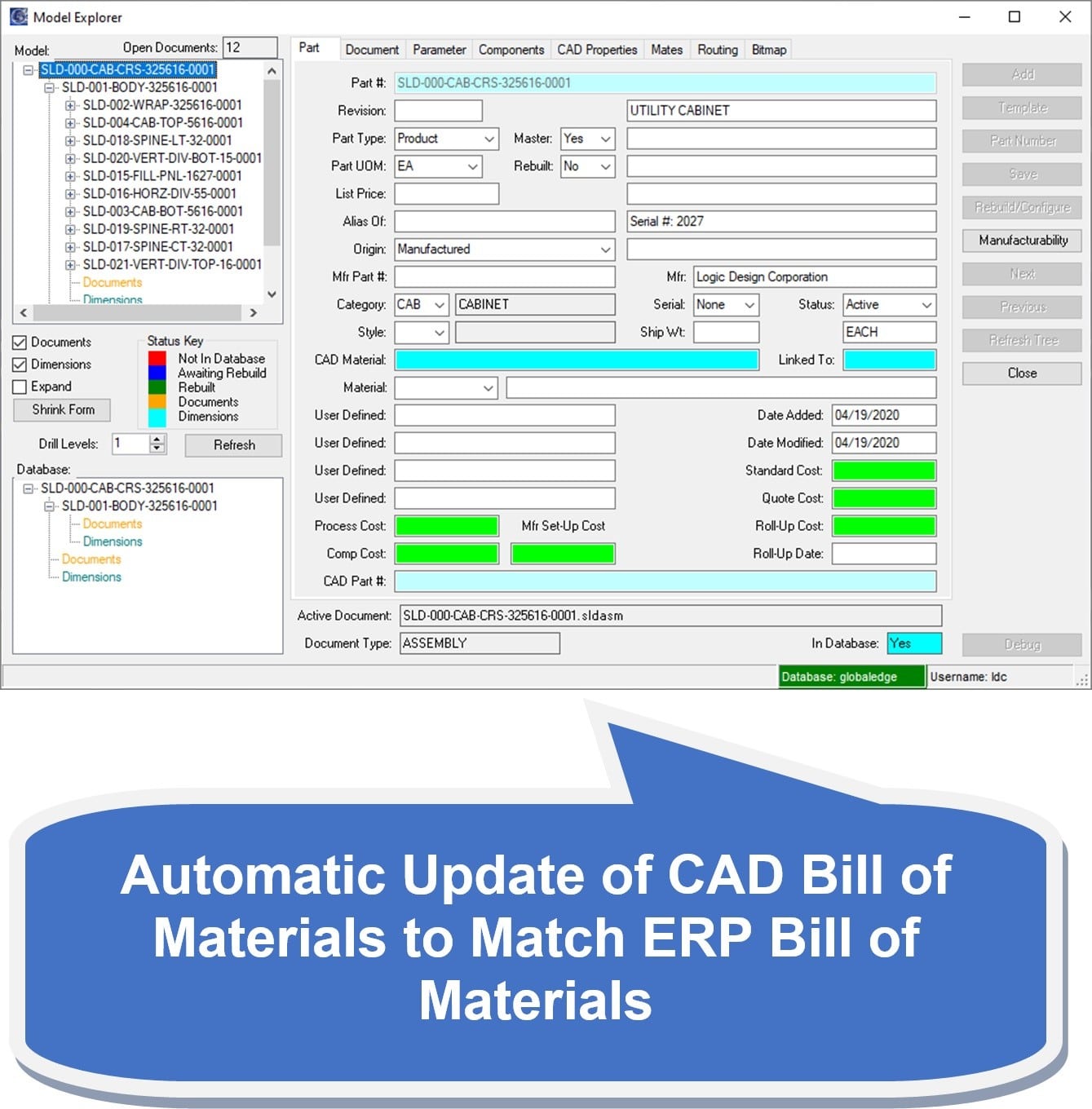
- Automatically Synchronizes CAD Bill of Materials with ERP Bill of Materials
- Automatically Generates Manufacturing Bill of Materials from CAD Bill of Materials
- Eliminates Retyping of Bill of Materials into ERP System
- Provides Accurate and Timely Information Throughout Manufacturing Enterprise
Synchronizing CAD Bill of Materials with ERP Bill of Materials
Achieving Real-Time Accuracy and Efficiency with Global Edge Engineering Assistant
Introduction
In today’s fast-paced manufacturing landscape, the accuracy and timeliness of information are paramount. As organizations strive to streamline their operations and eliminate inefficiencies, synchronizing Computer-Aided Design (CAD) Bill of Materials (BOM) with Enterprise Resource Planning (ERP) Bill of Materials emerges as a critical process. The integration of these two essential components ensures that engineering data flows seamlessly into business operations, supporting manufacturing, procurement, inventory management, and beyond.
The advent of advanced tools, such as Global Edge Engineering Assistant, has revolutionized how manufacturers handle BOM synchronization. By automating the linkage between CAD models and ERP databases, manufacturers can achieve unprecedented levels of accuracy, eliminate redundant data entry, and improve enterprise-wide visibility.
The Importance of BOM Synchronization
Bill of Materials are foundational documents in both engineering and manufacturing. In the engineering phase, the CAD BOM captures all components, assemblies, and subassemblies needed for a product’s design. Meanwhile, the ERP BOM acts as the backbone for business activities—tracking parts, managing inventory, and guiding manufacturing processes.
Discrepancies between CAD and ERP BOMs can lead to significant issues:
- Production delays due to missing or incorrect parts
- Inventory mismatches causing stockouts or overstock
- Cost overruns from incorrect material planning
- Quality problems if outdated designs are manufactured
Manual synchronization between these systems is not only labor-intensive but also prone to human error. An automated solution is essential for maintaining consistency and supporting agile manufacturing operations.
Global Edge Engineering Assistant: An Innovative Solution
Global Edge Engineering Assistant is designed to bridge the gap between engineering and business systems. It offers a simplified yet powerful method to synchronize CAD/Engineering Bill of Materials with ERP Bill of Materials, addressing the challenges associated with manual updates and providing real-time accuracy.
Direct Integration with SolidWorks CAD Model Assemblies
One of the standout features of Global Edge Engineering Assistant is its direct integration with SolidWorks CAD Model Assemblies. Through this connection, the BOM of each assembly is linked directly with the Global Edge database. As engineers add, remove, or modify components within the CAD environment, these changes are instantaneously reflected in the BOM. This real-time updating ensures that design changes are immediately communicated to downstream business processes.
Real-Time Data Synchronization
With Global Edge Engineering Assistant, synchronization is not a periodic batch process—it’s continuous and real-time. As soon as a component is added, removed, or changed in the CAD assembly, the BOM is synchronized with both the Global Edge database and the ERP system. This instantaneous reflection of design modifications eliminates lag and ensures that all stakeholders are working from the most current information.
Configurable ERP Interface
Global Edge Engineering Assistant comes equipped with a configurable ERP interface, enabling seamless translation and uploading of BOM data from the engineering environment to the ERP system. This interface bridges the technical differences between the CAD BOM format and the ERP BOM requirements, ensuring that data is accurately and efficiently communicated.
This configurability allows organizations to tailor the synchronization process to their specific ERP system—whether it’s SAP, Oracle, Microsoft Dynamics, or a custom solution. The interface ensures compatibility, supports complex mapping rules, and manages exceptions gracefully.
Eliminating Redundant Data Entry
Traditionally, engineering teams and operations staff spend countless hours transcribing and validating BOM data between systems. Not only is this tedious, but it also introduces opportunities for errors. Global Edge Engineering Assistant automates this process, eliminating the need for manual retyping and verification.
- Efficiency Gains: Staff can focus on higher-value activities, such as innovation and problem-solving, rather than administrative data entry.
- Error Reduction: Automated synchronization removes the possibility of transcription errors, missed updates, and outdated information.
Generating Manufacturing Bill of Materials from CAD BOM
Another transformative feature of Global Edge Engineering Assistant is its ability to automatically generate a manufacturing BOM from the CAD BOM. While the engineering BOM defines the complete product structure, the manufacturing BOM outlines the specific components, subcomponents, and materials required for production.
Configuration Engine for Optimal Routing
The included Configuration Engine analyzes the parameters of each CAD part—such as material, geometry, tolerance, and assembly methods—and determines the optimal routing steps for manufacturing. By leveraging this intelligence, the system can propose efficient processes for fabrication, assembly, and inspection, tailored to the specifics of the product design.
This functionality not only accelerates time-to-market but also supports lean manufacturing principles by reducing waste and optimizing resource allocation.
Benefits of Automatic BOM Synchronization
Organizations adopting Global Edge Engineering Assistant experience a wide range of benefits:
- Accurate, Timely Information: Data consistency across engineering and business systems ensures that everyone—from design engineers to shop floor operators—has access to the latest product information.
- Enterprise-Wide Visibility: Real-time synchronization supports cross-functional collaboration, enabling rapid response to design changes, supply chain disruptions, and production issues.
- Cost Savings: Eliminating redundant work and reducing errors directly lowers operating costs and improves profitability.
- Improved Quality: Manufacturing teams build from the latest designs, reducing the risk of producing obsolete or incorrect products.
- Scalability: Automated BOM synchronization supports growth, allowing organizations to manage complex product lines and high-volume production without increasing administrative burden.
Implementation Considerations
While the benefits of automated BOM synchronization are clear, successful implementation requires careful planning:
- System Compatibility: Ensure that the CAD and ERP systems are compatible with the integration solution.
- Process Mapping: Define the processes for data flow, exception handling, and approval workflows.
- Change Management: Train users on the new system and communicate the benefits to secure buy-in across the organization.
- Testing and Validation: Rigorously test the synchronization process to confirm accuracy and reliability.
Case Study: Transforming Manufacturing Operations
Consider a mid-sized manufacturer utilizing SolidWorks for product design and SAP for business operations. Prior to implementing Global Edge Engineering Assistant, the organization faced frequent production delays due to BOM discrepancies, leading to costly rush orders and customer dissatisfaction.
After integrating the Global Edge solution:
- BOM synchronization occurs in real-time, eliminating delays and errors.
- Manufacturing teams have instant access to updated part lists and routing steps.
- Product launches happen on schedule, with fewer last-minute changes and disruptions.
- Management enjoys enhanced visibility into operations and inventory, supporting smarter decision-making.
Conclusion
Synchronizing CAD Bill of Materials with ERP Bill of Materials is no longer a luxury—it’s a necessity for modern manufacturers seeking to stay competitive. Global Edge Engineering Assistant offers a sophisticated yet user-friendly approach to automatic BOM synchronization, integrating engineering and business systems, eliminating redundant data entry, and delivering timely, accurate information across the enterprise.
By harnessing its powerful features—direct CAD integration, real-time data synchronization, configurable ERP interfaces, and automatic manufacturing BOM generation—organizations can transform their operations, achieve new levels of efficiency, and unlock the full potential of their product lifecycle. In a world where speed, accuracy, and collaboration drive success, automated BOM synchronization is the key to future-ready manufacturing.
Eliminate Duplication Of Information And Effort
To see a demonstration as to how Global Edge Engineering Assistant can help eliminate duplication of information and effort throughout manufacturing enterprise, click on the link below to schedule a software demonstration.