Automated CAD Model Analysis
Blog Post 6.01.01 - Automate CAD Part Analysis for Accurate Quoting
Improve quoting accuracy with Automated CAD Part Analysis. Read More ...
Global Edge Video Blog-6.01
Video can’t be displayed
Automate CAD Part Analysis for Accurate Quoting
Most manufacturing companies utilize a variety of methods to generate sales quotes based on incoming Request For Quotes (RFQ). These methods are generally comprised of quoting spreadsheets, off-the-shelf quoting software, and quoting modules that are apart ERP systems. Also factored in the quoting process is tribal knowledge that is required to accurately include necessary fabrication / manufacturing steps to build customized products.
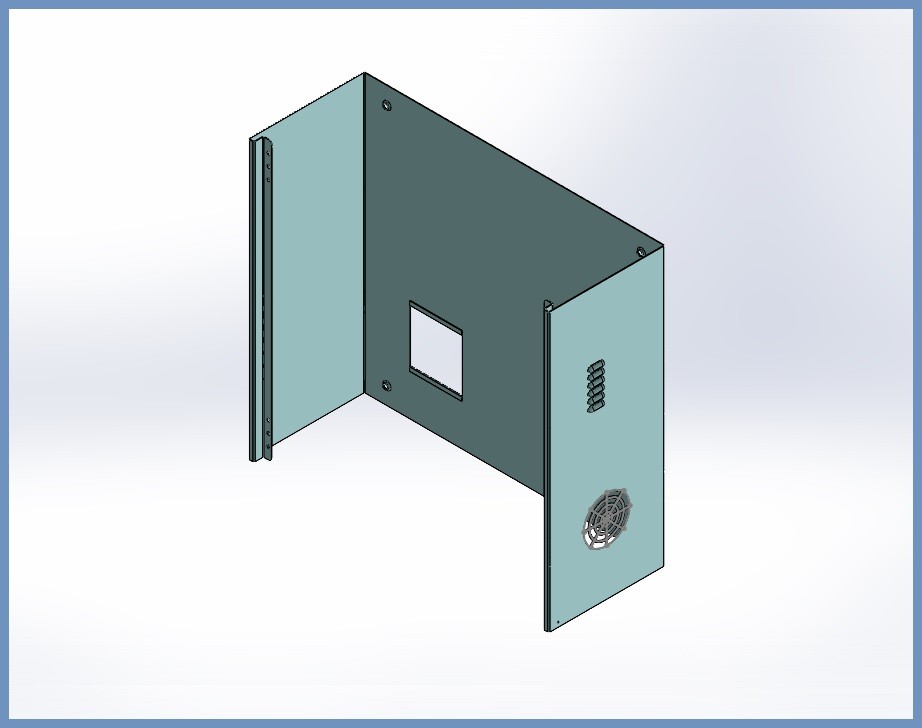
With regards to customized and engineered to order products, a time-consuming quoting process can be the manual analysis of 2D and 3D CAD Drawings / Models. Global Edge Engineering Assistant provides the capability to automatically analyze 2D DXF Flat Files and 3D Sheet Metal CAD Models and provide the necessary CAD Part Parameters which can help drive accurate and timely quoting.
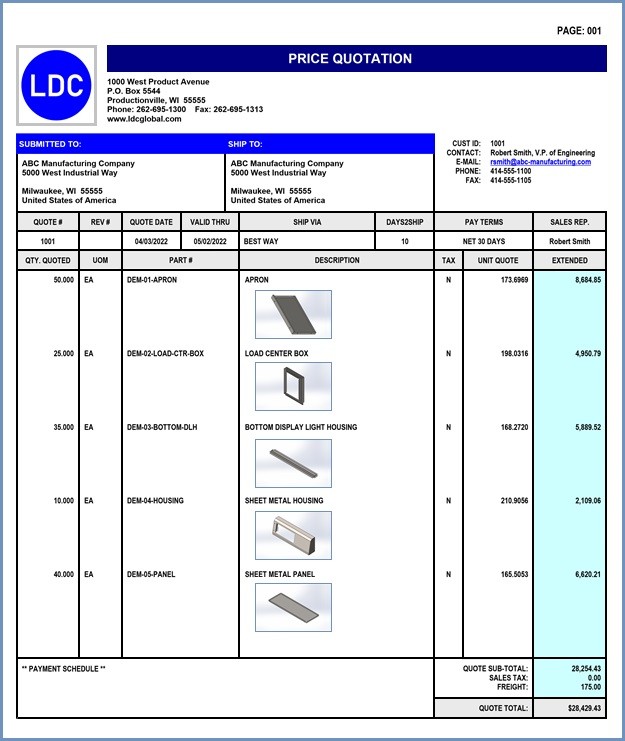
These CAD Part Parameters can be provided to and integrated into your existing quoting software to speed up the quoting process. The following is a partial list of the CAD Part Parameters that are automatically generated by Global Edge Engineering Assistant:
With regards to customized and engineered to order products, a time-consuming quoting process can be the manual analysis of 2D and 3D CAD Drawings / Models. Global Edge Engineering Assistant provides the capability to automatically analyze 2D DXF Flat Files and 3D Sheet Metal CAD Models and provide the necessary CAD Part Parameters which can help drive accurate and timely quoting.
These CAD Part Parameters can be provided to and integrated into your existing quoting software to speed up the quoting process. The following is a partial list of the CAD Part Parameters that are automatically generated by Global Edge Engineering Assistant:
- Material / Thickness / Part Weight / Bend Radius
- Blank / Flat (Length & Width)
- Cutouts / Holes (Count & Size)
- Minimum / Maximum Bend Length
- Minimum / Maximum Bend Angle
- Minimum / Maximum Flange Width
- Minimum Pem Hole to Bend Line Gap
- Minimum Embossment to Bend Line Gap
- Minimum Louver to Bend Line Gap
- Maximum Up / Maximum Down Bend
- Fold / Hem / Extrude Counts
- Minimum Taper / Die Cut to Bend Line Gap
Automating CAD Part Analysis for Accurate Quoting
Transforming Quoting Efficiency and Precision through Advanced Automation
Introduction
Manufacturing companies face increasing pressures to deliver accurate and timely quotations in response to incoming Request for Quotes (RFQs). In today’s competitive landscape, the speed and precision with which a company can generate quotes can profoundly impact customer satisfaction, win rates, and overall profitability. Traditional quoting methods, reliant on spreadsheets, off-the-shelf software, or quoting modules within ERP systems, often struggle to keep pace with the complexity and customization demanded by modern engineered-to-order products. Furthermore, these processes frequently depend on “tribal knowledge”—the unwritten expertise possessed by seasoned employees—which introduces variability and risk of quotation errors.
As manufacturing moves toward digital transformation, automating the analysis of CAD parts has emerged as a critical lever for improving quoting accuracy and efficiency. By leveraging automated tools such as Global Edge Engineering Assistant, companies can streamline the manual review of 2D and 3D CAD files, extract essential manufacturing parameters, and seamlessly integrate this data into quoting systems. This document explores the challenges of traditional quoting, the benefits of automated CAD analysis, and the transformative impact it can have on manufacturing organizations.
The Challenges of Traditional Quoting Methods
- Manual Data Entry: Quoting staff often manually inspect and interpret CAD drawings, entering dimensions, features, and materials into pricing spreadsheets or software. This process is time-consuming and error-prone.
- Incomplete or Inconsistent Data: CAD drawings may be unclear, incomplete, or presented in a variety of formats, increasing the risk of misinterpretation or omissions.
- Dependency on Tribal Knowledge: Accurate quoting frequently relies on the experience and intuition of long-tenured employees, making it difficult to scale, standardize, or transfer knowledge.
- Slow Turnaround: For customized or engineered-to-order products, the manual review of complex 2D and 3D files can delay the quoting process by hours or even days, reducing agility and responsiveness.
- Accuracy Issues: Even small mistakes in interpreting CAD data can have significant downstream consequences, such as lost business due to over-quoting or eroded margins from under-quoting.
Automated CAD Part Analysis: A Game Changer
Automated CAD part analysis addresses these challenges by utilizing advanced software tools to extract key parameters from both 2D DXF flat files and 3D sheet metal CAD models. Global Edge Engineering Assistant exemplifies this new approach, delivering the capability to automatically analyze files and generate a comprehensive set of CAD part parameters required for quoting.
How It Works:
- The software accepts both 2D and 3D CAD files, supporting industry-standard formats.
- Automated algorithms parse the files, identifying critical features such as material type, thickness, part weight, cutouts, bends, and flanges.
- Extracted parameters are presented in a structured format, ready for integration with existing quoting systems or software.
- These parameters can be further processed to generate accurate pricing, lead times, and manufacturing plans.
Key CAD Part Parameters for Quoting
Automated CAD analysis tools are capable of identifying and quantifying a wide range of part features, including but not limited to:
- Material: Type and grade of material specified in the CAD file.
- Thickness: Measured thickness of the part, which affects both cost and manufacturability.
- Part Weight: Calculated based on geometry and material density, essential for shipping and handling estimates.
- Bend Radius: All bend locations and their respective radii.
- Blank/Flat Length & Width: Dimensions of the unfolded (flat) part before bending or forming.
- Cutouts/Holes (Count & Size): Number, size, and position of all cutouts, holes, and slots.
- Minimum/Maximum Bend Length: Shortest and longest bends present in the design.
- Minimum/Maximum Bend Angle: Range of bend angles required by the part.
- Minimum/Maximum Flange Width: Smallest and largest flanges present.
- Minimum Pem Hole to Bend Line Gap: Distance from installed PEM hardware to the nearest bend line.
- Minimum Embossment to Bend Line Gap: Distance from embossments to bends.
- Minimum Louver to Bend Line Gap: Relevant for ventilation and other louvered features.
- Maximum Up/Maximum Down Bend: Identifies the furthest protruding bends on either side of the part.
- Fold/Hem/Extrude Counts: Total instances of folding, hemming, or extruding features.
- Minimum Taper/Die Cut to Bend Line Gap: Ensures manufacturability and die clearance.
Integration with Quoting Software
Once the parameters are extracted, they can be seamlessly provided to and integrated with existing quoting platforms, whether they be custom spreadsheets, off-the-shelf solutions, or ERP quoting modules. This integration enables:
- Instant Population of Pricing Models: Automated data feeds drastically reduce manual data entry.
- Enhanced Consistency: Standardized data output eliminates discrepancies caused by human error or interpretation.
- Faster Quoting: Reduced turnaround time from RFQ receipt to quote delivery—often from days to hours or even minutes.
- Scalability: The ability to handle higher quote volumes without proportional increases in staff or resources.
Benefits of Automated CAD Part Analysis
Automating CAD part analysis for quoting offers a host of benefits:
- Increased Accuracy: Precision extraction and calculation of part parameters ensure quotes are based on real, manufacturable data.
- Reduced Labor Costs: By minimizing manual intervention, companies can focus experienced staff on higher-value activities.
- Knowledge Retention: Reduces reliance on tribal knowledge and protects institutional expertise from turnover risks.
- Improved Customer Experience: Faster, more accurate quoting improves customer satisfaction and increases the likelihood of winning orders.
- Competitive Advantage: Automation enables rapid response and flexible pricing, making companies more competitive in the marketplace.
- Data-Driven Decision Making: With every quote, organizations build a database of part features and costs that can be used for continual improvement.
Best Practices for Implementation
To fully realize the benefits of automated CAD part analysis, manufacturing organizations should consider the following best practices:
- Assess Current Quoting Process: Map out the existing workflow, identifying bottlenecks, manual steps, and knowledge gaps.
- Choose the Right Automation Tool: Evaluate solutions like the Global Edge Engineering Assistant for compatibility with your CAD file formats and quoting systems.
- Standardize CAD File Submissions: Educate customers and internal teams on preferred file types and standards to optimize automation accuracy.
- Integrate with Existing Systems: Work with IT and engineering teams to link automated outputs to pricing, ERP, or PLM systems.
- Train Staff: Equip quoting, engineering, and sales teams with training on the new automation workflows and troubleshooting methods.
- Measure and Optimize: Track key performance indicators such as quote speed, accuracy, win rate, and customer satisfaction to drive continuous improvement.
Case Study: Accelerating Quotes with Automation
Consider a mid-sized fabrication company that previously took up to three days to respond to complex RFQs. By implementing Global Edge Engineering Assistant, the company reduced average quote turnaround time to under six hours. Quote accuracy improved, leading to reduced rework and increased order win rates. Staff were able to manage more RFQs without additional headcount, and the company gained a reputation for responsiveness and precision.
Conclusion
As the manufacturing sector continues to evolve, companies that embrace automation in their quoting processes will be best positioned for success. Automated CAD part analysis not only improves quoting accuracy and speed but also enhances scalability, consistency, and knowledge retention. By integrating advanced tools such as Global Edge Engineering Assistant, manufacturers can eliminate manual bottlenecks, reduce errors, and win more business in an increasingly competitive marketplace. The future of accurate quoting is automated—and it starts with smart CAD analysis.
Cut Your Quoting Time By 50 Percent
To see a demonstration as to how Global Edge Engineering Assistant can save your company significant time, money and increased sales opportunities, click on the link below to schedule a software demonstration.